Showing posts with label Facebook. Show all posts

Monday, November 1, 2010

Facebooker and Narcissist

Facebooker and Narcissist.
Facebook is a medium for sharing among friends, to express life, whether it be the message content, stories, photos, audio, and video. if the expression is said narcissist is a reasonable due to facebook is the easiest to use media to show these expressions.
Are you constantly updating your Facebook status?

A few weeks ago a number of researchers from various universities to publish its findings related fecebooker narcissistic attitude, such as a study conducted Soraya Mehdizadeh, researchers from York University, Canada, users are constantly updating up tend narcissistic. Mehdizadeh said, for those narcissistic, up really help them control how they see friends or people they want.

Facebookers and Narcissist
In his study, Mehdizadeh surveying 100 participants aged 18 to 25 years about the use of Facebook. After that, they were given psychological tests to determine how much they seek the attention of people and considered himself important. As a result, there is a positive relationship between level kenarsisan identified through test results, with how frequently participants check their Facebook accounts, so the conclusion the more frequent checking the facebook account that is increasingly him Narcissist? if the views of respondents used age 18-25 years, then 100 percent no matter their narcissistic is reasonable. Well if all this fair?
As long as not too negative, having positive impact and run socialization well then Narcissist seems no problem.

Sunday, September 12, 2010

Facebook from your mobile carrier

Facebook from your mobile carrier .
Facebook zeroFacebook officially launched a new feature called Facebook Zeros. This feature is a minimalist version of the excess m.facebook.com is no charge or free. But it applies only to certain operators who cooperate with Facebook.

What is the difference with m.facebook.com?
Zero facebook faster, because it only displays text only. And if you click the link to the photos then will be charged for internet data. So if only updates the status or reading without flipping through the photo would not cut off your pulse.

Zero To access this version go to:
* Zero.facebook.com or
* 0.facebook.com (dot zero facebook dot com)

For usage of this function to the state you please confirm whether the operators Cellular Phone supports this feature or not.

The others info:

Upload a Photo | Take a Photo | Create an Album

Upload a Photo | Take a Photo | Create an Album.
You can Upload a Photo from your drive, take a photo with webcam and create an album with many photos.

Very easy to upload a photo into your Facebook, you can start, Firstly Login in your Facebook account and click Profile then Under Wall menu You can click a photo (at right Attach).

Create an Album
Well now you can also create albums for your pictures into Your Facebook acccount.

The Others information;

Friday, August 13, 2010

How to Login to Multiple Accounts

How to Login to Multiple Accounts Simultaneously With One Browser Firefox

Do You have more than one Facebook account? You want to log into multiple accounts at once Facebook? No need to login to each account one by one, that old-fashioned way.

Now there are more practical ways to use the Mozilla Firefox browser, which makes you able to log into multiple accounts at once Facebook. Consider the following trick:

1. Close Firefox first.
2. Click the Start button, select Run and type: firefox.exe-ProfileManager.
3. Click Create Profile -> Next
4. Write the name of your new profile. His name is up to you.
5. Click Finish.
6. Create a new Firefox shortcut and give it another name.
7. Right click your icon, select "Properties" and add the following command at the end:-no-remote-p NamaProfil (NamaProfil is the name fit the profile that you created in step 4).
8. Finally : Click the "Apply"

Well now to test whether the settings that we make is successful, run-ons of the old and new. Then you login with a different account. If login successful, then you have successfully run Firefox in parallel. That is the trick.

Good luck.

ref : googling.com in fesbuk blog.

Others, read more:

Wednesday, August 4, 2010

Adding facebook like this button


Adding facebook like this button .
As a blogger or webmaster, Facebook give simple way to create like this button on a blog or site. Adding like this button is the one of efforts to share the information of your blog to member of facebook readers.Adding facebook like this buttonSo, how to add facebook like this button?
Firsly : You are Log in to your blog.
then, In your dashboard click "Layout", then you open facebook plugins here : http://developers.facebook.com/docs/reference/plugins/like
Then, You will find the blank form. Fill as blog URL and other information is required. Finally Click Get Code. You can pun one appropriate code to add in your layout blog. Or you can
Or You paste the Facebook Like this button code Directly Above / Before
<data:post.body/>
Form Like ThisAdding facebook like this button .

-------------------------------------------------------------------------------
Others information.

Wednesday, July 14, 2010

How to Block Facebook

How to Block Facebook in the Computer in order to not accessible. The reasons why The corporate environment or a particular office blocking facebook is ; Facebook's reduced work productivity when they use to inappropriate time. So, The Company blocks employee computers each deliberately blocked so that can not be accessed. The reason,


How to block Facebook in the computer is very easy:

1. Open window explorer

2. Click on C -> WINDOWS -> system32 -> drivers -> etc

3. Click on (2x) 'hosts', then open with notepad

4. Will emerge a kind of script, the last line is normally the six digit number, for example: 127.0.0.1. Replace digits with:
0.0.0.0 http://facebook.com
0.0.0.0 facebook
0.0.0.0 facebook.com
0.0.0.0 www.facebook.com
0.0.0.0 http://www.facebook.com
0.0.0.0 69.63.176.140

5. Save. Done. Try signed FB, if it still can be opened, restart your computer.

----------
ref: wawanwae.blogspot.com/2010/03/cara-memblokir-facebook-di-komputer.html

Others Face book info:

Tuesday, June 29, 2010

Email Filter Report

There is one related questions about facebook email report:
What are filters that the message is forwarded to gmail is the only certain emails? Because yahoo email for facebook! My yahoo inbox until more than 2000 who have not read just from Fb (Facebook)!

Answer by Joko. S
About that one, set the notification via email from selected facebooknya necessities. Let you setup email notifications from facebook. Select the Settings -> Account Settings -> Notifications; and Select Notifications are an important sent.


Email Filter.

Facebook

Is it important information?

--------------------------------------------------------------------------------------
Other facebook informations :

Friday, June 18, 2010

Add a friend on Facebook

Add a friend on Facebook, it is easy now. Nowadays do not need to enter the Captcha Code. Add as friend (enter) or add him as a friend Button > Send Request > Skip (or choose a photo for send suggestions). But you should to know him before if you want to add one new friend in your fesbuk account. Because if one of the add friend evil then it could endanger yourself as well. So, be careful adding a new friends.

Thursday, June 17, 2010

Setup Privacy Controls

Setup Privacy Controls
Privacy Controls on Facebook
If you have the wrong setup in your Facebook Privacy Control, then this could endanger yourself. Information from your self and your friend can be misused by third parties who are not responsible in using cyber crimes. For that reasons, you can start setting up at the Privacy menu within your Facebook account correctly.


(/privacy/explanation.php)

Knowing viruses on your Facebook

Knowing viruses on your Facebook

CAREFULLY! Virus & photos on your Facebook profile in your website ..

Common Interest - Self-help

The longer the virus and a scam is a problem in facebook.

when you get the message:

"Hey do u realize your face book picture is all over -link- OR
"Hey do u realize your photo is all over faceboook -link- OR
"Has anyone messaged youu to let you know your profile is being featured on image -link-"

CAREFULLY. Do not follow this link or try to log in with your facebook info. They can trace your personal information in this way. Then, You do not know to send the same message type to the wall all your friends. Thus the way this message to spread. Computer spiders call logs in your profile. The only way to stop this virus by way of careful and distribute warnings to the users facebook. After that, make sure you change the facebook login info (password)

So spread the news to your friends.

"INVITE all your friends to join in this group" so that your friend read this and help stop the spread of this virus.


You may also send a message to our performance is about information on this topic. also learned about the scam on the internet, read a lot about this, use anti-virus.

Be careful and use the Internet safely!

Source : facebook.com/group.php?gid=68682358374


Statement from Facebook about Upload songs

Statement from Facebook about Upload songs

STATEMENT FROM FACEBOOK
Most likely member of Facebook, this one has uploaded song files. So there must be permission from a third party once if you want to upload a song. (ref blog : fesbuk)

I confirm that under the Statement of Rights and Responsibilities, I gave Facebook a royalty-free license nonexcludable and apply worldwide for use, reproduce, distribute, transmit, and generally plays the voice recordings that I upload to Facebook. I understand that I am fully responsible for all licensing, reporting and payment obligations, if any, to third parties.

I certify that I have the authority to license it to Facebook and that I have, or have been obtained from third parties as appropriate, all the rights that are required to facebook can use a voice recording that I upload, including the right of composing music and other copyrighted works contained in these sound recordings. I also declare that the use of sound recordings by the Facebook does not violate the rights of third parties, and agrees to defend and liberate the responsibility of Facebook, agents, and employees from any and all claims, liability, damages, costs, and expenses (including reasonable attorneys' fees ) arising from or related in any way with the voice recordings. I'm not going to demand accountability for Facebook to third-party rights violations against a voice recording that I upload.

This is clear copyright infringement, therefore Mbah Djambrong will not be sharing songs on facebook ... We apologize for those who want to listen to sample songs from Mr Djambrong, We will share at another site. Thank You ..

Ref : facebook.com/note.php?note_id=305959608941


Wednesday, June 16, 2010

How to delete photos on my facebook tags

How to delete photos on my facebook tags .

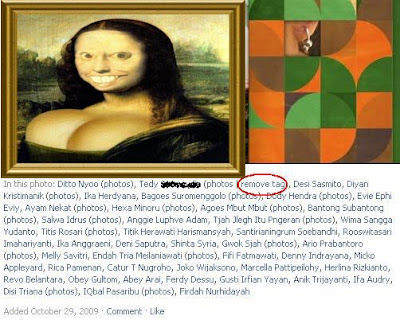
ugly photo
Very often, I get the photos from other colleagues that have become Friend on Facebook, but unfortunately the photos I did not like and often sent to tag someone else. Photos are not liked here will be disturbing emails report constantly we accept that the tags from our other friend.

Some of colleagues us every so often to tag their very bad pictures in the tags to my facebook(ha ha, ..annoying)

Then, how do we can delete the photos tag arbitrarily into our account?
1. Login to Your Facebook Account.
2. Photos Menu.
3. Enter the Photo that You don't like it.
4. Click, remove tag.

That is so simple, so the way it is, we go into the photo to see photos of his.

Then, at the bottom of the photo that reads "In This Photo" find our names and after See you select the words "Remove Tag" then click "Remove Tag", that is finished (See in the red circle picture). So The images are already in the tags to we're not going to appear again.

Easy, It isn't right? Come on, save a photo album on your facebook from ugly pictures.

Do your friends ever get bad Photos like that?

---------------------------------------------------------------------

Followers